Invoice Reports and Business Analytics
Know exactly where your money is. Track revenue trends, chase overdue invoices with aging reports, and understand your best clients, all from one dashboard.
Revenue trend reports
See your invoiced and collected revenue month by month. Spot seasonal patterns, track growth, and compare periods to understand whether your business is moving in the right direction.
- Monthly and annual revenue breakdowns
- Paid vs outstanding at a glance
- Multi-currency revenue tracking (ZAR, USD, NGN)
- Compare current period against previous periods
Revenue collected, last 4 months
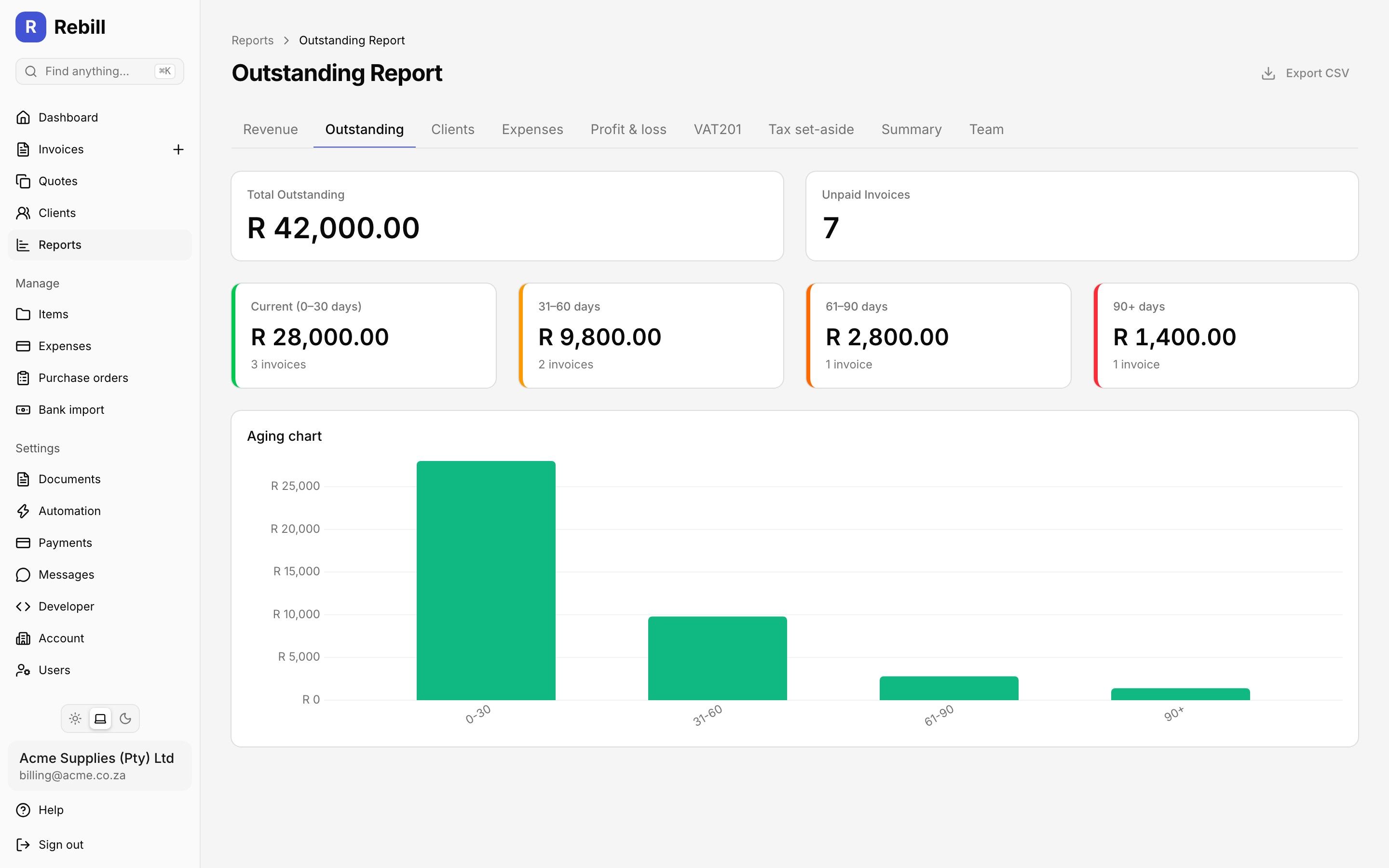
Aging Report: Outstanding Invoices
1 to 30 days
4 invoices
31 to 60 days
2 invoices
61 to 90 days
1 invoice
90+ days
1 invoice
Aging report: 30, 60, 90 days
Know exactly how long each invoice has been outstanding. The aging report groups unpaid invoices into time buckets so you can prioritise your debt collection and protect your cash flow before invoices become unrecoverable.
- Automatic grouping by overdue days
- Drill down to see individual invoices per bucket
- Send payment reminders directly from the report
- Filter by client or date range
Client analytics
Understand which clients drive your revenue and which are slow to pay. Client analytics show you total billed, total collected, average payment time, and outstanding balances per client, so you can focus on what matters.
- Revenue ranked by client
- Average days to pay per client
- Outstanding balance per client
- Client payment history at a glance
Top clients by revenue
Acme Corp
12 days avg
R 84 000
Paid: R 84 000
BuildRight SA
28 days avg
R 56 500
Paid: R 48 200
Nkosi Consulting
45 days avg
R 38 000
Paid: R 22 000
Expense Report: This Month
Software & subscriptions
28% of total
Travel & transport
24% of total
Marketing
21% of total
Professional services
27% of total
Expense report
See all your business costs broken down by category for any period. The expense report sits alongside your revenue data so you can see real net profit, not just how much you invoiced. Export to CSV to hand to your accountant at year end.
- Expenses broken down by category
- Net profit view: revenue minus expenses
- Filter by date range
- Export to CSV for your accountant
Payments report for bank reconciliation
Every payment you received in the period, card or EFT, in one list. Each row shows the date, the client and their client code, the method, the reference and the invoice the money went to, so you can tick it off against your bank statement line by line.
- Totals by payment method
- Filter by client or by method
- Payments held on account show as on account
- Export to CSV on every plan
Recording payments from a bank statement in the first place? Bank statement import matches CSV lines to open invoices, and the payments report then shows what was captured for the period. Step by step: the payments report in the help centre.
Reports that fit how you run your business
Quick ranges, your own financial year, and reporting that scales with your team and your currencies.
Quick Time Ranges
Jump between this month, last quarter, this financial year and more with one click on the dashboard and every report.
Financial year presets.
Set your financial year start month once. Every report and the dashboard offer this financial year, last financial year, year to date and rolling ranges.
Team report.
Quotes won and lost, win rate and invoices outstanding per team member.
Per-Currency Reporting
On Premium with multi-currency, every report keeps a separate running balance per currency.
Reports for how you actually run the year
Projected income.
Draft and scheduled invoices dated in the future show as a pipeline next to issued revenue, never mixed into it. See next month before it happens.
Cash or accrual.
Revenue and client reports run on invoice date or on payment date. Pick the basis per report.
VAT and tax set-aside.
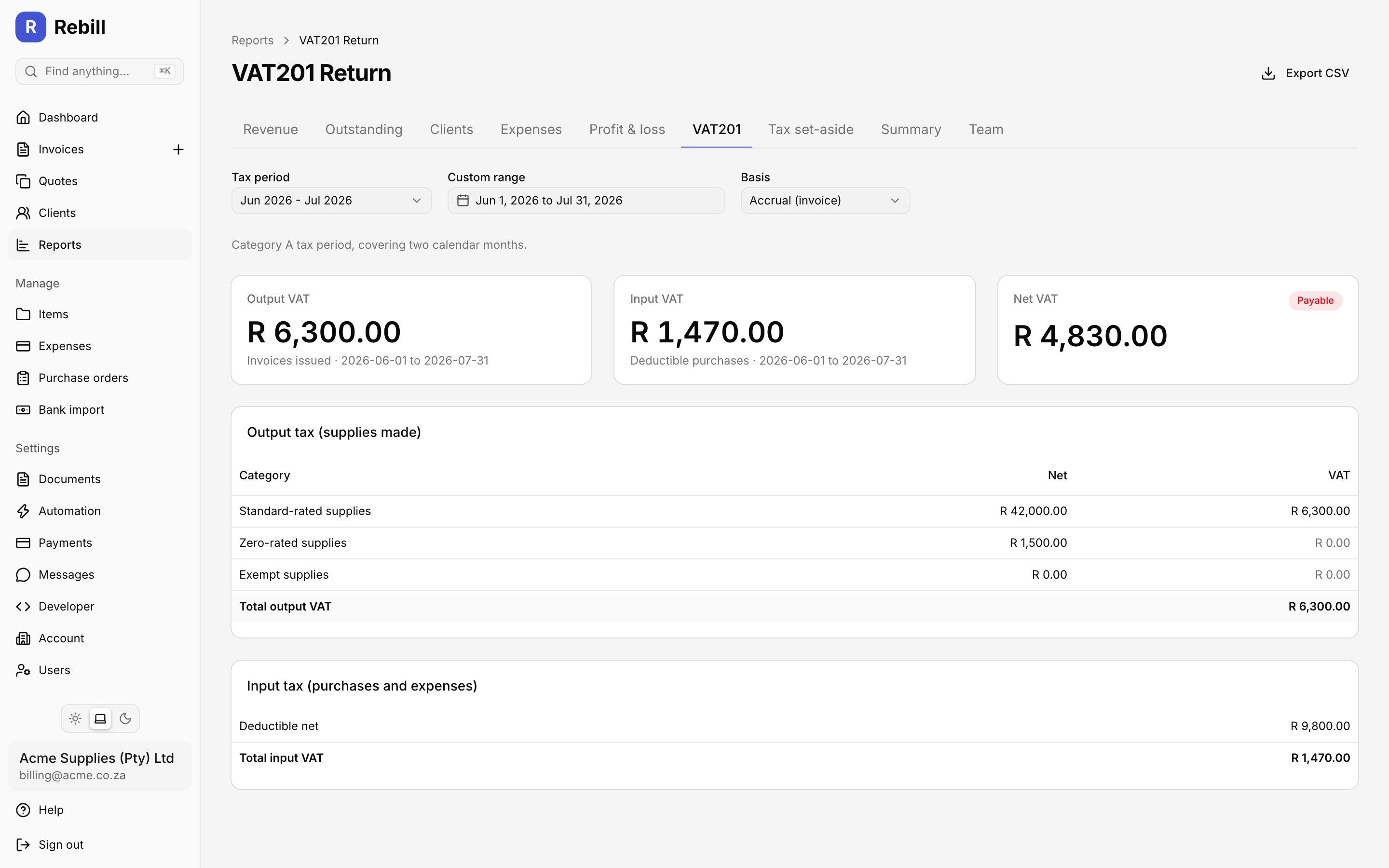
VAT201 figures for the period and an income tax set-aside estimate, on their own page.
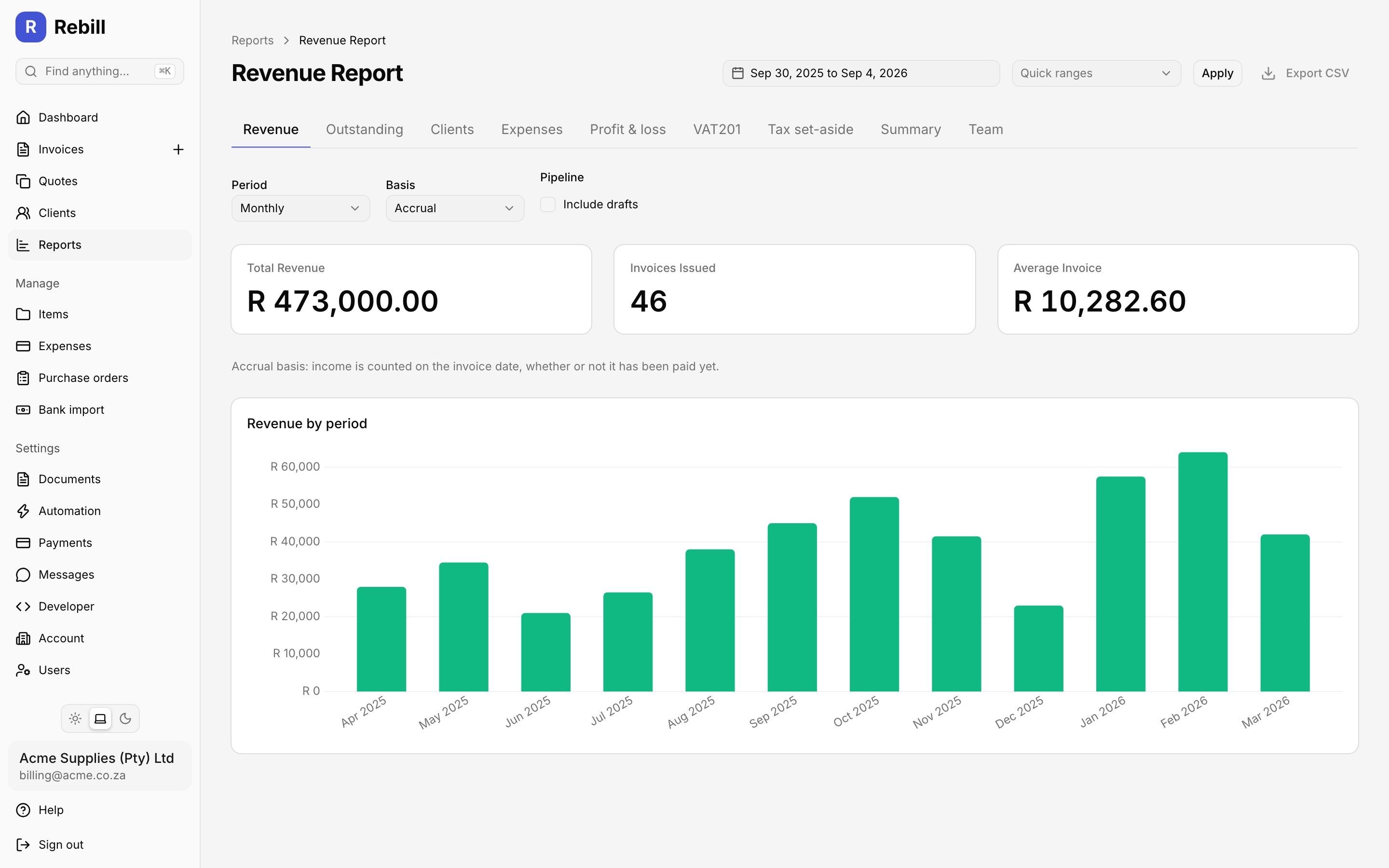
The revenue report. Monthly totals, invoices issued and average invoice value, with links to every other report along the top.
Quick answer
What are invoice reports?
Invoice reports are summaries of your billing and payment activity that help you understand the financial health of your business. The most important report for South African small businesses is the aging report, which shows outstanding invoices grouped by how long they have been overdue, typically 30, 60, and 90 or more days. This allows you to prioritise debt collection before invoices become unrecoverable.
Revenue trend reports show how much you have invoiced and collected over time, helping you identify growth patterns and seasonal dips. Client analytics reveal which clients contribute most to your revenue and which are slow to pay. An expense report breaks down your business costs by category and, when viewed alongside revenue, gives you a clear picture of net profit at any point in the year. Together, these reports give South African freelancers, consultants, and small business owners the data needed to manage cash flow effectively. To keep clients up to date, learn how to send a statement of account, and read our guide on how to track business expenses.
Frequently asked questions
What is an aging report for invoices?
How do I see which invoices are overdue?
Can I export reports from Rebill?
Does Rebill have an expense report?
How do reports help with cash flow?
Can I see revenue I have invoiced but not been paid for?
Is there a report for reconciling payments with my bank statement?
Explore more Rebill features
Know your numbers. Get paid on time.
Rebill gives South African small businesses the reporting tools to stay on top of revenue, chase overdue invoices, and prepare for SARS. Start free today.