Quote Software for South African Businesses
Create professional quotes, add your terms, deliver supporting files, send by email or WhatsApp, follow up automatically, let clients accept online, and convert to invoices in one click. Win more business and get paid faster.
Free plan available. Premium from R99/month.
Need one quote without an account? Try the free quote generator.
Every step of the quoting workflow in one place
Professional quote software built for SA freelancers, consultants, and tradespeople.
Professional Quote Templates
Create detailed quotes with line items, quantities, unit prices, and VAT. Your logo and branding appear automatically. Quotes look as professional as your invoices, because they use the same template.
Quote Expiry Dates
Set a validity period on every quote. Once expired, clients can no longer accept it via the portal. This protects you against accepting work at outdated prices and creates urgency for the client to respond.
Online Accept and Decline
Clients click a link to view their quote and can accept or decline with a single button. No printing, no signing, no PDFs emailed back. You receive a notification the moment they respond.
Automatic or One-Click Conversion
When a client accepts a quote online, Rebill can convert it to an invoice automatically with no action from you. Or convert manually with one click any time. Either way, all line items, pricing, and client details carry across with no re-typing.
Quote Tracking Dashboard
See all your quotes at a glance: draft, sent, accepted, declined, and expired. Know exactly what is outstanding and which opportunities need a follow-up. Never lose track of a pending quote again.
Send by Email or WhatsApp
Send quotes by email or deliver them via WhatsApp, wherever your client prefers to communicate. Quotes sent via WhatsApp include a link for clients to view and accept online.
Terms and Conditions
Add your standard terms to every quote. Require clients to accept your terms before they can accept the quote online, and the exact terms they agreed to are saved with the quote. You can also print your terms as a final page on the PDF.
Deliver Files and Links
Attach links to your line items on any plan, such as a portfolio or spec sheet, or upload files directly on Premium. They travel with the quote and appear in a Resources section on the PDF, so the client gets everything in one place.
Follow-Ups and Internal Notes
Set a follow-up date on any quote and work from a single follow-ups list so no opportunity goes cold. Keep private internal notes on a quote that the client never sees.
Item Price History
Rebill remembers how your item prices change over time, so you can quote with confidence and see what you charged before.
PDF Straight to the Client
Attach the quote PDF to the email your client receives, so they have a copy to keep, not just a link.
Owner per quote.
Assign each quote to the person who wrote it. The team report shows win rates and outstanding value per person.
Quotes you can keep editing until the client answers
Edit until the client answers.
Change lines, prices and dates on a draft, sent or expired quote. The number stays the same and the client sees the latest version at the same link. Accepted, declined and converted quotes are locked.
Numbers and notes of their own.
Quotes run on their own number sequence, separate from invoices, and a client can have their own quote prefix. Set the notes every new quote starts with, separate from your invoice notes.
A discount on the whole quote.
Take a percentage or a fixed amount off the quote total, on top of any line discounts. It prints on the quote and PDF, and stays on the invoice when the quote is converted.
Show only what you want.
Hide the quote status or the validity date from the quote your client sees and the PDF, with one switch each in your quote defaults.
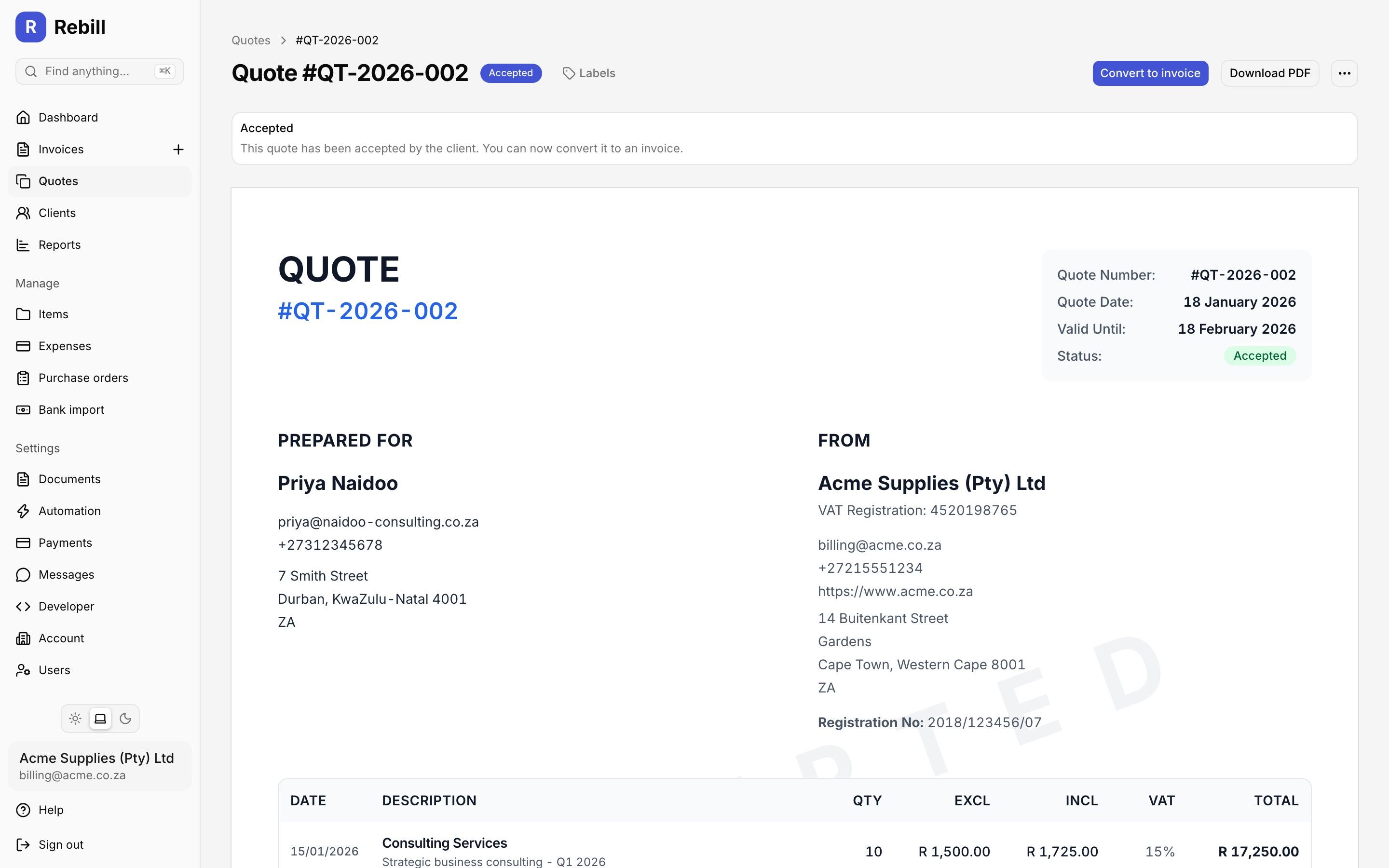
Send a quote, let the client accept online and convert it to an invoice in one click.
Quick answer
What is quote software?
Quote software is a tool that helps businesses create, send, and track professional price estimates before work begins. In South Africa, quotes (also called estimates, pro formas, or proposals) are a standard part of the business process for freelancers, contractors, consultants, and tradespeople. Sending a professional-looking quote before starting work builds client trust and sets clear expectations on scope and price. Rebill's quote software lets South African businesses create detailed quotes with line items, VAT, and their business branding, then send them to clients by email or WhatsApp. Clients can accept or decline the quote online without printing or signing. When a quote is accepted, Rebill converts it to a SARS-compliant invoice in one click, eliminating duplicate data entry. The full quote history is stored in Rebill so you can track which quotes are pending, accepted, or expired. You can add your terms and conditions to every quote and require clients to accept them before the quote can be confirmed, with the agreed terms saved on record. Set follow-up dates to keep opportunities moving, and attach files or links to line items so the client has everything they need in one place. If you are unsure which to send, read our guide on when to send a quote vs an invoice.
Frequently asked questions
What is the difference between a quote and an invoice?
Can clients accept quotes online?
How do I convert a quote to an invoice?
Do quotes expire?
Can I customise quote templates?
Can I add terms and conditions to my quotes?
Can I follow up on quotes I have sent?
Can I change a quote after sending it?
Explore more Rebill features
Win more work with professional quotes
Create quotes in seconds, let clients accept online, and convert to invoices with one click. Free plan available.