Professional Invoicing Software for South Africa
Create professional invoices in seconds. Add your logo, send by email or WhatsApp, and let clients pay online. VAT registered? Add your number and every invoice becomes a SARS tax invoice.
Free plan available. Premium from R99/month.
Everything you need to invoice professionally
For every South African business, VAT registered or not.
Tax Invoices When You Need Them
Not VAT registered? Every invoice is a clean standard invoice. Add your VAT number and Rebill switches to SARS tax invoices: the Tax Invoice heading, both VAT numbers, 15% VAT and gapless numbering.
Custom Branding and Logo
Upload your business logo and it appears on every document you send. On Premium, pick a custom brand colour and Rebill applies it to the payment pages your clients see and the emails they receive, so everything matches your business.
Flexible Line Items
Add as many line items as you need, each with its own description, quantity, unit price and discount. VAT registered? Set standard, zero-rated or exempt per line, and switch on Prices include VAT when your prices already include it.
Delivery Notes
Generate a delivery note from any invoice with a single click. Send it alongside the invoice or separately when goods are dispatched. Same line items, professional format.
Client Credits
Apply credits to a client's account when you need to reduce an outstanding balance. Credits are tracked per client and automatically offset against their next invoice.
Gapless Invoice Numbering
Drafts stay unnumbered until you send, and issued invoices are numbered in strict sequence with no gaps. Customise the prefix (e.g. INV-2024-001) and Rebill handles the rest. Clean, audit-friendly records without manual bookkeeping.
Purchase Order Numbers
Add your client's PO number to any invoice so their accounts team can match it instantly and pay you faster.
Internal Labels
Tag invoices with your own labels to organise work your way. Labels stay internal and never appear on client documents.
PDF Attached to Every Email
Turn on PDF attachments and every invoice email arrives with the PDF included, ready for the client to file straight away.
Tax invoices, numbered in the order you send
Tax Invoice, automatically.
Add your VAT number and every invoice carries the words Tax Invoice, your VAT number and the client's, and the 15% VAT line. Quotes and delivery notes carry the client VAT number too.
Gapless numbers, assigned at send.
Drafts have no number. The number is assigned the moment an invoice leaves draft, so the sequence has no gaps and no cancelled drafts in the middle. Set the next number yourself when you move from another system.
Labels, PO numbers and CC addresses.
Tag invoices with internal labels nobody but you sees, put the client's purchase order number on the document, and send to up to three CC addresses per client.
Send more invoices, and know they arrived
For the month-end run, the move from your old system, and the client who says the invoice never came.
Bulk invoices from a CSV.
Upload a CSV with one line per invoice line. Rebill builds one draft invoice per client, shows you the totals, and emails the whole batch in one run. Uploading the same file twice never bills anyone twice.
Bring your history across.
Import past invoices from a Wave export or any spreadsheet. Numbers, dates and payments come with them, so statements and reports show your full history from day one. Nothing is sent to clients.
Delivered, opened or bounced.
Every invoice, quote and purchase order keeps a notification history of the emails and WhatsApp messages sent. For email Rebill sends, it shows whether the message was delivered, bounced or marked as spam, and whether it was opened.
Your own email address.
On Premium, connect your SMTP2GO account or any SMTP server and client emails go out from your address, with the Rebill branding removed if you like. Pick an email style (Minimal, Card, Letter or Bold), preview it and send yourself a test.
Client codes and labels.
Give every client a code automatically, with your own prefix, and it prints on their invoices, quotes and statements. Label clients your way and filter the client list by label.
Find anything.
Press Ctrl K, or Cmd K on a Mac, and type a client name, a recent invoice or quote number, or a setting to jump straight to it.
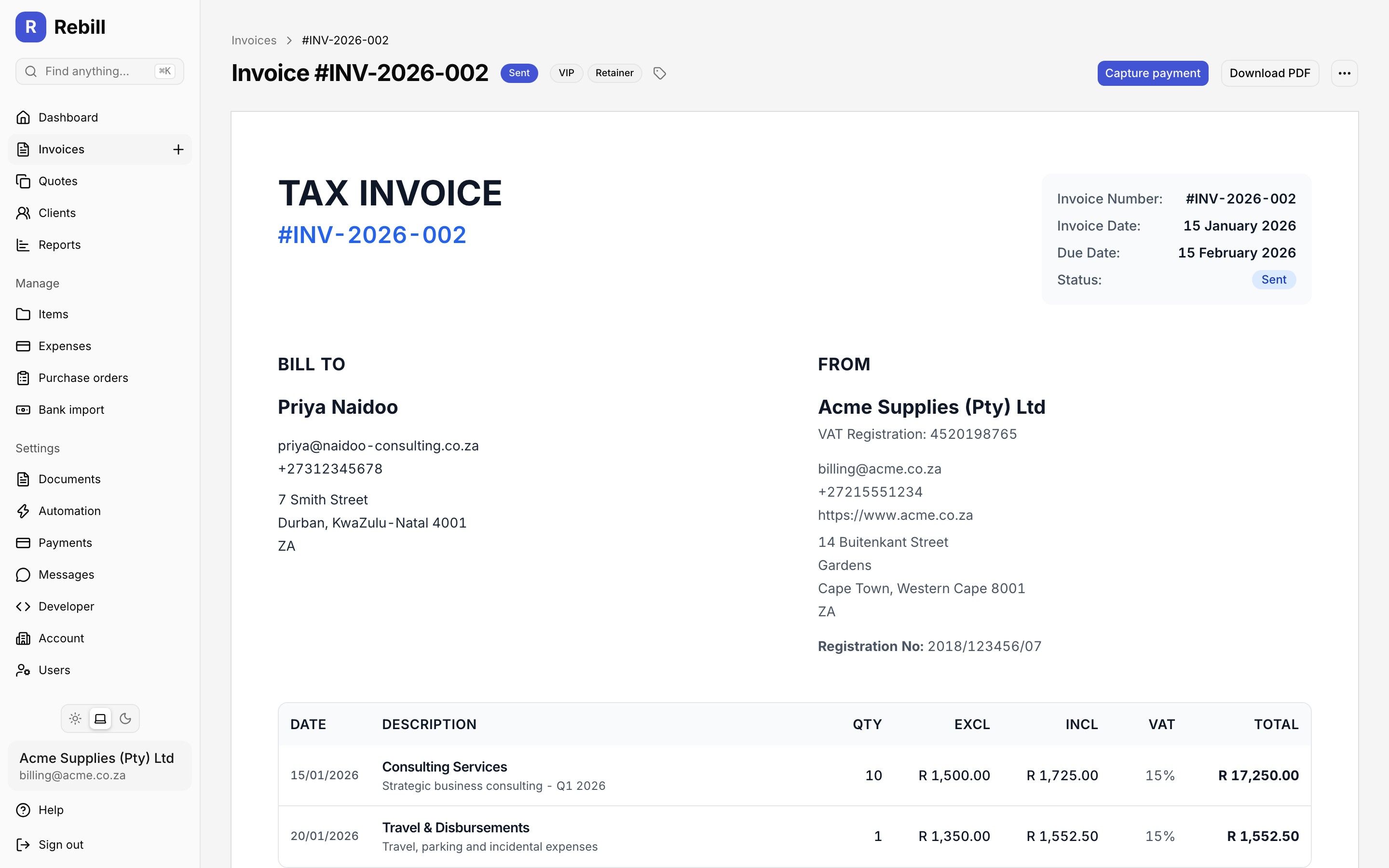
Professional invoices, with VAT worked out for you once you are registered.
Quick answer
What is Rebill's invoicing feature?
Rebill's invoicing feature is a professional invoice creation tool built specifically for South African businesses, freelancers, and consultants. It generates SARS-compliant tax invoices that meet the requirements of the Value-Added Tax Act, including automatic 15% VAT calculations, unique invoice numbering, and all mandatory fields required by the South African Revenue Service. Users can customise invoices with their business logo, brand colours, and payment terms. Line items can be added individually with descriptions, quantities, and prices, and VAT is calculated automatically per line item. Completed invoices can be sent to clients by email or directly via WhatsApp, the primary business communication channel in South Africa. Rebill also supports delivery notes, giving businesses a complete paper trail that satisfies both their clients and SARS requirements. New to invoicing? Read our guide on what an invoice is and the full SARS tax invoice requirements.
Frequently asked questions
What must appear on a South African tax invoice?
Is Rebill SARS compliant?
Can I add my logo to invoices?
How do I create a VAT invoice in Rebill?
Does Rebill support credit notes and client credits?
Are Rebill invoice numbers sequential with no gaps?
Can I add my client's VAT number to the invoice?
Can I create many invoices at once?
Can I bring my old invoices into Rebill?
Can invoices come from my own email address?
Explore more Rebill features
Start invoicing professionally today
Free plan available. No credit card required. Your first invoice in minutes.